Understanding Role-Based Access Control (RBAC)
Last updated: October 15, 2026
Overview
RBAC controls what users can access in Ivo through a hierarchy of permissions, roles, teams, and users.
How It Works
Permissions are specific access rights to features or resources in Ivo. They define exactly what actions can be performed. A list of permissions is attached at the end of this document.
Roles are collections of permissions grouped together for convenience. A role can contain any combination of permissions needed for a job function. A list of pre-defined roles are attached at the end of this document.
Teams are groups that can be assigned multiple roles. This allows easy management of access for entire departments or project groups.
Users can receive access in two ways:
Direct role assignment
Team membership (inheriting all roles assigned to that team)
When a user has multiple sources of permissions (from different roles or teams), the system grants the most permissive level of access. This means users get the highest level of access available to them across all their roles and team memberships.
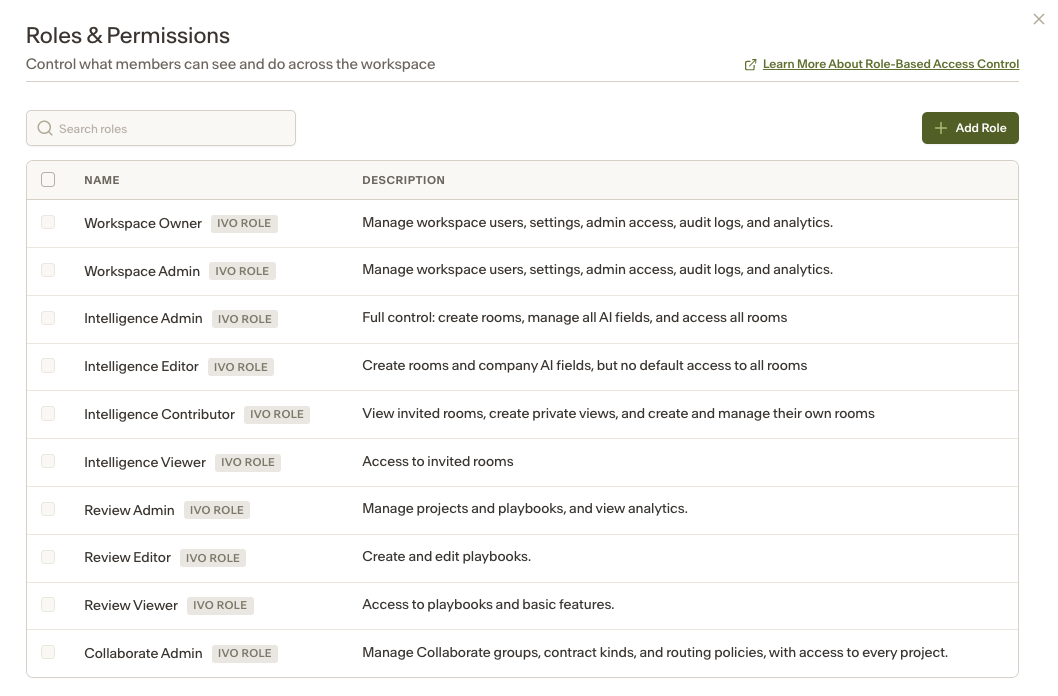
Ivo Defined Roles:
For a detailed breakdown of role capabilities, on app.ivo.ai, navigate to Settings > Workspace > Roles & Permissions to click on and see the permissions associated with each role.
General and Review Permissions
Permission | Workspace Owner | Workspace Admin | Review Admin | Review Editor | Review Viewer |
Word add-in access | - | - | ✓ | ✓ | ✓ |
Google Docs access | - | - | ✓ | ✓ | ✓ |
Web Review access | - | - | ✓ | ✓ | ✓ |
Add-in feedback | - | - | ✓ | ✓ | ✓ |
User and role management | ✓ | ✓ | - | - | - |
Workspace profile | ✓ | ✓ | - | - | - |
View all user analytics | ✓ | ✓ | ✓ | - | - |
Manage playbooks | - | - | ✓ | ✓ | - |
View audit log | ✓ | ✓ | - | - | - |
Manage Admin Access | ✓ | ✓ | - | - | - |
Manage Skills | ✓ | ✓ | - | - | - |
*Intelligence Roles have none of the above permissions
Intelligence (Repository) permissions
Permission | Workspace Owner | Workspace Admin | Intelligence Admin | Intelligence Editor | Intelligence Contributor | Intelligence Viewer |
Repository access | - | - | ✓ | ✓ | ✓ | ✓ |
Admin access to all rooms | - | - | ✓ | - | - | - |
Create rooms | - | - | ✓ | ✓ | ✓ | - |
Upload documents in all rooms | - | - | ✓ | ✓ | - | - |
Manage company AI fields | - | - | ✓ | ✓ | - | - |
View company AI fields | - | - | ✓ | ✓ | ✓ | ✓ |
Lock AI fields | - | - | ✓ | - | - | - |
Manage contract relationships | - | - | ✓ | ✓ | - | - |
Manage document field values | - | - | ✓ | ✓ | - | - |
Create and manage private views | - | - | ✓ | ✓ | ✓ | - |
Manage integrations | - | - | ✓ | - | - | - |
*Review Roles have none of the above permissions
Features
Permission | Description |
Word Add-in Access | Access to Word add-in functionality |
Google Docs Access | Access to Google Docs add-in |
Web Review Access | Access to web review features |
Add-in Feedback | Ability to provide feedback via the add-in |
Manage Playbooks | Ability to create, delete, and edit playbooks |
User Management | Ability to manage workspace users |
Workspace profile | Ability to manage workspace information such as company profile and entities |
Repository Project Selector | Access to repository project selection |
View Audit Log | Access to audit log information |
Resources
Permission | Description |
View team analytics | Read access to team analytics data |
Read all playbooks | Read access to all playbooks in the workspace |
Write to all playbooks | Write access to all playbooks in the workspace |
Playbook access | View or edit permissions that can be assigned per playbook |
Intelligence
Permission | Description |
Repository Access | Grants access to the Repository workspace. Users can view and access Rooms they are invited to (or all Rooms if their role allows). |
Manage Contract Relationships | Allows users to create, edit, and maintain relationships between contracts (e.g., amendments, parent-child agreements, related documents) within the Repository. |
Create Rooms | Enables users to create new Rooms within the Repository to organize documents. Rooms can contain sub-rooms and inherit the user's permissions in parent Room. |
Manage Company AI Fields | Allows creation, editing, and deletion of Company AI Fields. These fields are visible across the entire workspace and included in exports by default. |
View Company AI Fields | Allows users to view Company AI Fields across the workspace but not modify them. |
Create Private Views | Allows users to create Views that are private to themselves. Private Views are not visible to other users in the Room. |
Admin Access to All Repository Rooms | Grants automatic Admin access to all Rooms (including sub-rooms) within the Repository, regardless of explicit invitation. |
Manage Repository Integrations | Allows users to configure and manage integrations between the Repository and external systems (e.g., document storage, data exports, or third-party tools). |
Manage Document Field Values | Enables users to edit extracted AI field values and metadata associated with documents within a Room. |
Upload Documents in All Rooms | Allows users to upload new documents into any Room within the Repository where they have access. |
Repository API Access | Grants access to interact with the Repository programmatically via API, allowing integration with external systems and automated workflows. |
Room permissions
Access within a room is controlled by one of three room-level permission settings:
Admin: Full control of the room, including sharing access with others.
Editor: Can create Views and upload or delete documents.
Viewer: Has read-only access to room content.
Permission | Room Admin | Editor | Viewer |
Room-specific permissions | |||
View documents | ✓ | ✓ | ✓ |
Upload new docs | ✓ | ✓ | - |
Edit document fields | ✓ | ✓ | - |
Delete docs | ✓ | ✓ | - |
View templates | ✓ | ✓ | ✓ |
Edit Room details | ✓ | - | - |
Create Sub-room within Room | ✓ | ✓ | - |
Public Views | |||
Create, edit, and delete Public Views | ✓ | ✓ | - |
Sharing | |||
Share Room with more people | ✓ | - | - |
Who gets room access by default
Users with the roles of Repository Admin have access to all rooms by default.
All other users must be explicitly added to a room and assigned a room-level permission, either Admin, Editor, or Viewer, before they can access that room.