Document Visibility
Last updated: October 20, 2026
Document Visibility is a Repository feature that lets Intelligence Admins control which documents individual users can see within a room, based on the value of a field on each document. When configured, two users in the same room can see entirely different sets of documents depending on how visibility is set up.
This feature is off by default and has no effect on any existing users or rooms unless explicitly enabled.
How it works
When Document Visibility is enabled for a room, Ivo checks whether the signed-in user’s email address matches the value of a configured field on each document. If it matches, the document is visible to that user. If it does not match, the document is hidden.
Documents where the configured field has no value are visible to everyone in the room.
Intelligence Admins, and any users with the document visibility permission, can always see all documents regardless of how visibility is configured.
Who can configure Document Visibility
Only Intelligence Admins can configure Document Visibility settings.
How to set it up
Navigate to Settings → Repository → Document Visibility.
Under Conditions, select the field you want to use as the visibility control.
Save your settings. Visibility will now be applied based on whether each user’s email matches the value of the selected field on each document.
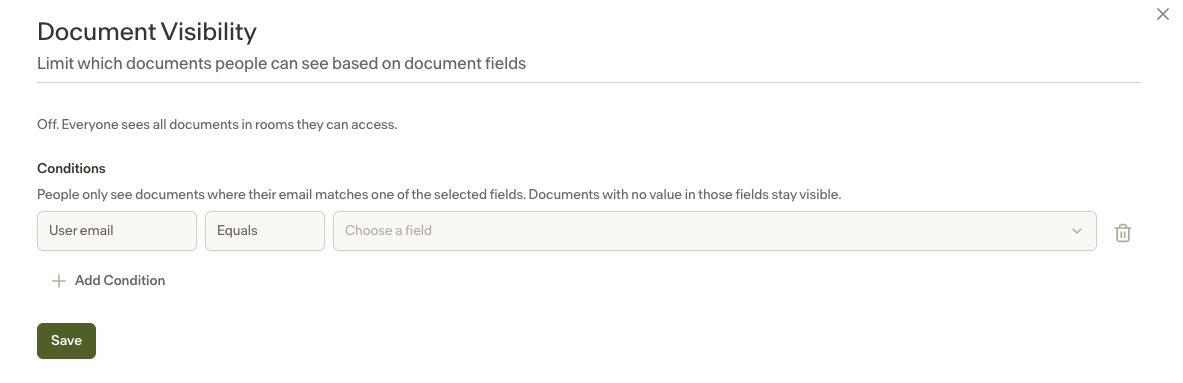
To turn Document Visibility off completely, remove all configured visibility filters.
Supported field types
Only manual fields can be used for Document Visibility. Manual fields are fields that have been added to documents via the API. AI fields are not supported because they do not have a value unless they are added to a view.
The field must be one of the following types:
String
Bullet
Notes
Document Visibility restricts access at the document level within a room. It does not affect room-level access.
The only condition currently supported is User email equals Field value. Additional conditions may be added in the future.
Intelligence Admins always see all documents, regardless of visibility settings.
This feature is off by default. Enabling it requires explicit configuration by an Intelligence Admin.