Using Compare Versions in Redline Review
Last updated: June 1, 2026
Compare Versions is an optional feature available when running a Redline Review. It allows you to upload a prior version of your contract so that Ivo focuses its analysis only on the redlines introduced in the most recent round of negotiations, ignoring changes from earlier rounds.
What is Compare Versions?
When a contract goes through multiple rounds of negotiation, it can accumulate redlines from many different versions. Without Compare Versions, Ivo reviews all tracked changes present in the document, regardless of when they were introduced.
Compare Versions lets you specify the version of the contract that was sent to the counterparty before their most recent round of redlines. Ivo then uses that as a baseline and limits its review to only the new changes introduced on top of it.
Example: If a contract has gone through 10 rounds of redlining, you can upload the 9th version as your baseline. Ivo will then review only the redlines added in the 10th round, rather than the full history of tracked changes.
How to Enable Compare Versions
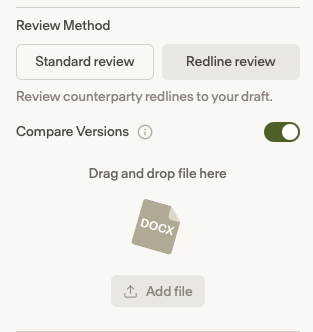
Start a new review and select Redline Review as your review method.
Once Redline Review is selected, the Compare Versions toggle will appear.
Toggle Compare Versions on.
Upload the prior version of the contract. This should be the version that was sent to the counterparty before their most recent redlines were made.
Continue through the rest of the review setup as normal.
When to Use Compare Versions
Use Compare Versions when:
Your contract has gone through multiple rounds of negotiation and contains redlines from previous rounds that are already agreed upon.
You only want Ivo to focus on what the counterparty changed in their most recent revision.
You want to avoid noise from earlier tracked changes that are no longer in dispute.