AI Fields: Single-Select and Multi-Select
Last updated: August 31, 2026
You can now create AI Fields that extract values from a fixed list of options you define. Instead of free-text extraction, Ivo picks only from the values you specify, keeping your data clean and consistent across your repository.
Field types
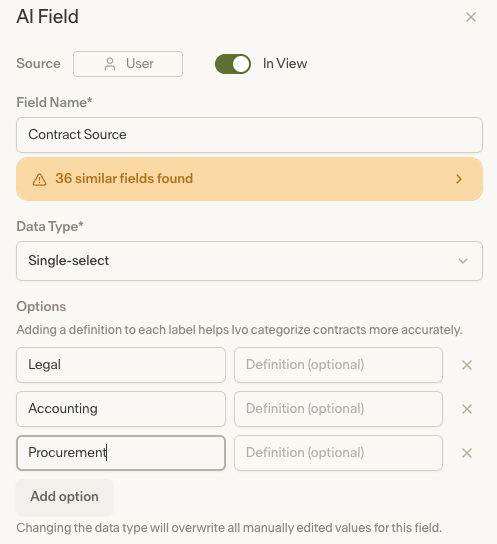
Single-select — Ivo extracts one value from your defined list. Useful for fields like Contract Type where each contract should map to a single category, for example NDA, MSA, or SOW.
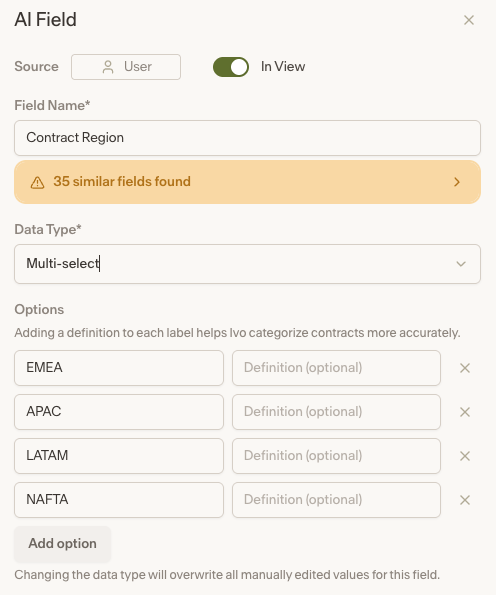
Multi-select — Ivo extracts one or more values from your defined list. Useful for fields like Regions Mentioned where a contract may reference multiple regions.
How it works
When setting up an AI Field, select Single-select or Multi-select as the data type and define the list of options. Ivo will only return values from that list when extracting data. Fields support dropdown edits for manual corrections and can be used for filtering within Repository views.
Notes
Single-select and Multi-select AI Fields can currently be created via the Repository UI only. Public API support for creating these field types is not yet available.
Exporting views that include Single-select or Multi-select AI Fields is supported in both the Repository UI and the public API.