Online Terms and Conditions
Last updated: August 3, 2026
When you upload a contract that references an external URL, such as a link to a vendor's online terms and conditions, Ivo will automatically fetch that online document and make it accessible from the Relationships tab. This means you can see the full picture of your agreement without having to manually track down and upload referenced documents.
How it works
When Ivo detects a URL referencing an online contract within an uploaded document, it fetches that contract automatically. The online document will appear in the Relationships tab of the uploaded contract so you can see how the two documents relate to each other.
Online documents fetched this way do not appear in the main Repository view alongside your uploaded contracts. They are only accessible through the Relationships tab, keeping your repository clean and organized.
Composite view
If the online contract modifies a master agreement you have uploaded, or if you have only uploaded an amendment that contains a link to the master agreement, the online document will also appear in the Composite view. This allows Ivo to reflect the full, updated terms of the agreement.
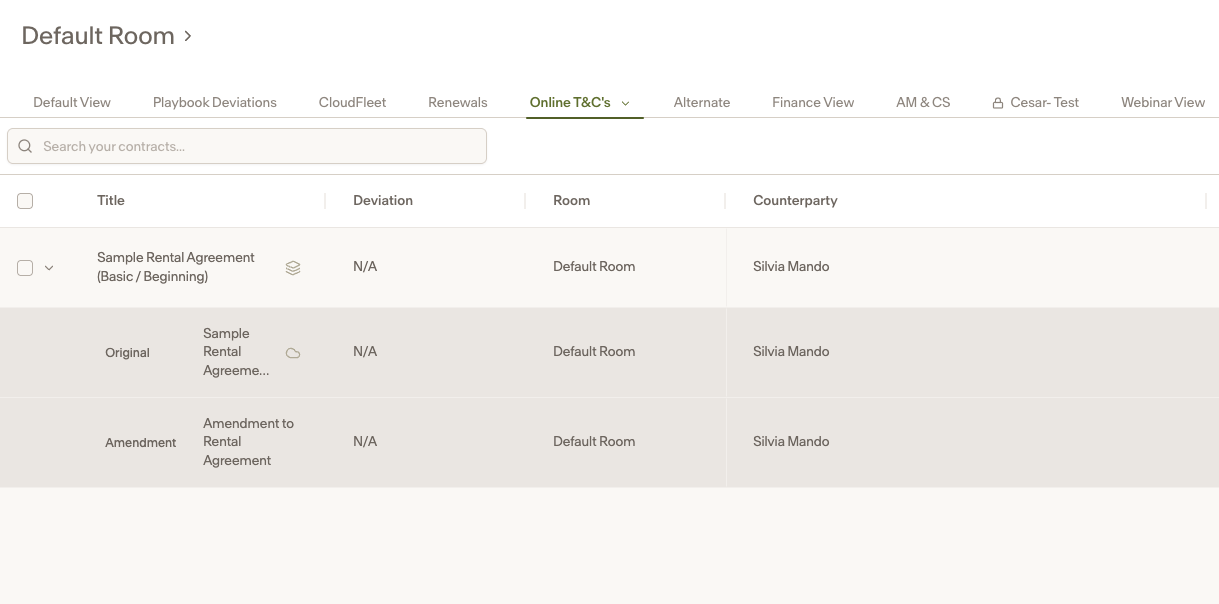
The online terms and conditions document can be seen here, denoted by the cloud icon.
Notes
Online documents fetched from URLs do not count against your contract limit.
Online documents are only accessible through the Relationships tab and Composite view. They do not appear in the default Repository view.
This feature works automatically whenever Ivo detects a referenced URL in an uploaded contract. No manual action is required.
Composite view will reflect the online document only when the relationship between the uploaded contract and the online document is an amendment relationship.