Creating and Managing Teams
Last updated: June 4, 2026
Admins can create teams within a workspace to organize users and manage access more efficiently.
Before you begin
You must have admin permissions in your workspace to create or manage teams.
Create a Team
Go to app.ivo.ai
Navigate to Settings
Select Teams list under Workspace
Click Teams
Click + Add Team
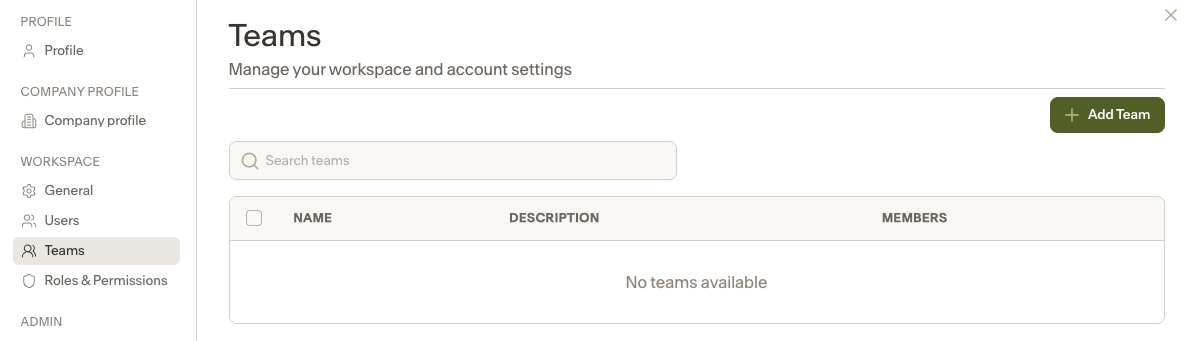
Enter the following details:
Team Name
Description (optional)
Members to include in the team
Roles assigned to each member
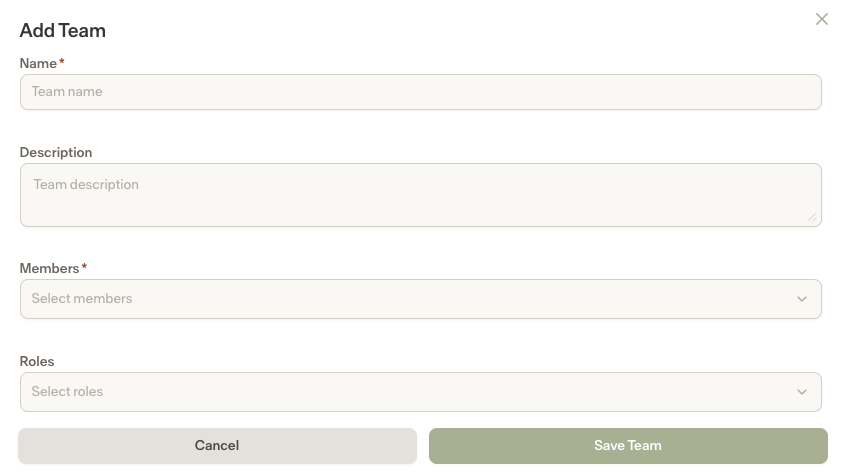
Click Save Team to finish. Your team will now appear in the Teams list.
Edit a Team
Go to Settings → Workspace → Teams
Click the team name you want to update
Modify the team name, description, members, or roles as needed
Save your changes
Delete a Team
Go to Settings → Workspace → Teams
Select the checkbox next to the team you want to remove
Click Delete at the bottom of the page
Confirm the deletion when prompted
Notes
Only admins can create, edit, or delete teams.
Deleting a team removes the team grouping but does not delete users from the workspace.