Customizing Assistant with Personal Instructions
Last updated: October 21, 2026
Assistant instructions let you personalize how the Ivo Assistant responds to you, so its outputs better match your preferred style, jurisdiction, or working preferences. Instructions are set at the user level, meaning they apply to you only and do not affect other users in your workspace.
How to add assistant instructions:
Go to app.ivo.ai and click Settings in the left navigation.
Select Profile.
Find the Assistant Instructions field and enter your preferences in plain language.
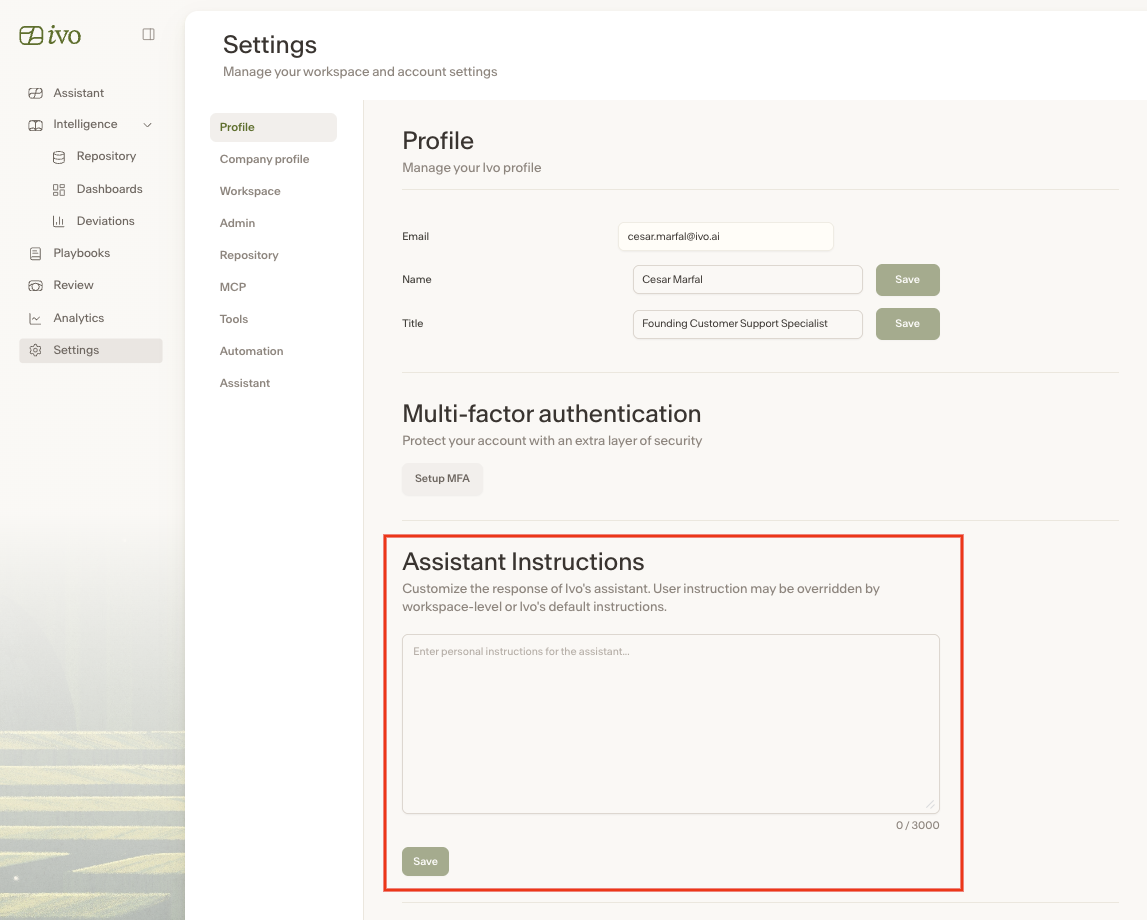
Save your changes.
Not sure what to write?
If you’re not sure where to start, use the User Output Preferences Builder skill in the Skills Library. It guides you through a series of questions about your work and preferences, then generates personalized Assistant instructions for you — so you don’t have to face a blank input field.
To use it:
Open Assistant in the Ivo web app.
Open the Skills Library and find User Output Preferences Builder under Ivo skills.
Click the skill to run it. Assistant will ask you a few questions about your role and preferences.
Once complete, copy the generated instructions and paste them into your Assistant Instructions field in Settings.
Your instructions will now be applied every time you use Assistant, across Word, Google Docs, and the web portal.