Assistant Anywhere
Last updated: July 6, 2026
Assistant is now available across more of Ivo, not just in its dedicated full-page view. Assistant Anywhere brings Assistant directly into Repository, Dashboards, Deviations, Playbooks, and Analytics, so you can ask questions and get insights without leaving the page you're working on.
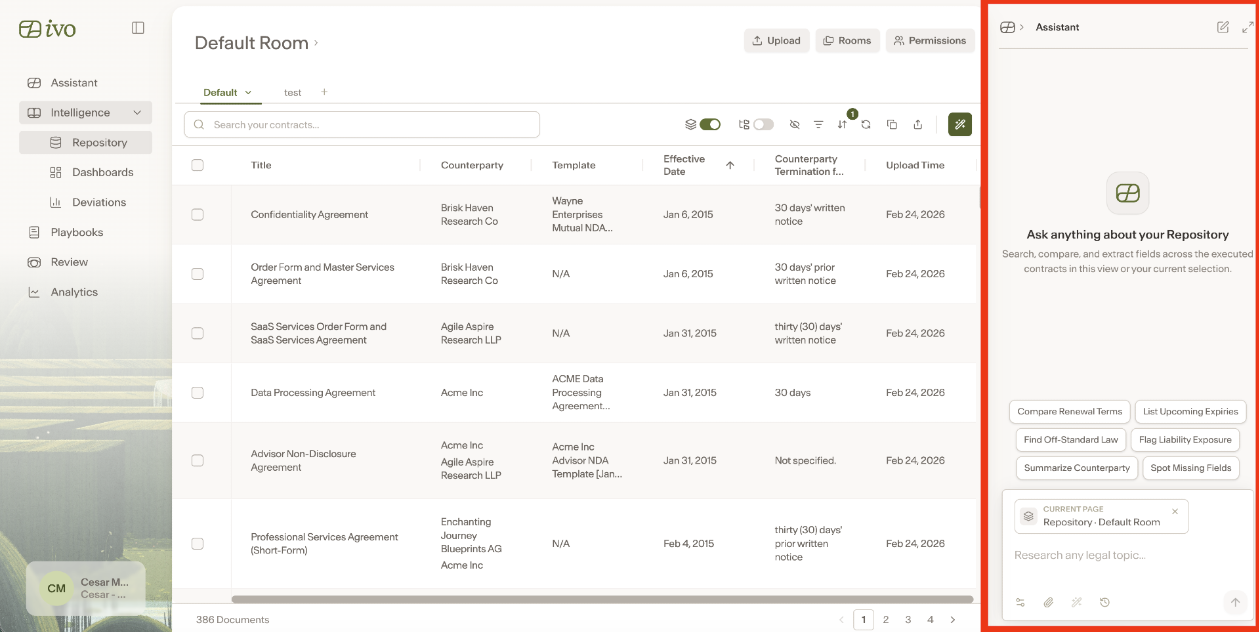
Where you'll find it
Assistant Anywhere is by default on the following pages:
Repository
Dashboards
Deviations
Playbooks
Analytics
On these pages, Assistant is context aware. It can see what's currently on your screen and answer questions about it directly, without you needing to copy or describe anything yourself.
What you can do with it
Ask about the current page.
Assistant can see and respond to anything visible on the page you're viewing, including different states of that page. For example, you can open a document in Repository, a chart in Dashboards, or a template in Deviations, and ask Assistant questions specific to what's open.
Bring specific documents into context.
In Repository, you can select one or more documents and ask Assistant questions about exactly those documents.
Work with Playbooks and Deviations.
Ask questions about your Playbooks and Deviations, or request adjustments, directly from those pages.
Build custom reports in Analytics.
Ask Assistant to create custom usage reports right from the Analytics page.
Move between sidebar and full page.
If you need more room to work, expand Assistant into the full-page view with one click, then return to exactly where you were with another click.
Hide the sidebar.
If you'd rather have the extra screen space, you can collapse the Assistant sidebar at any time.