Using the Assistant feature
Last updated: June 3, 2026
The Assistant feature allows you to ask natural language questions about the contract you're reviewing, generate redlines, pull in data from multiple sources, and receive AI-driven, citation-backed responses — all without leaving Word. You can use it to check for specific obligations (e.g., “Does this agreement contain an auto-renewal?”) or to draft new contract language (e.g., “How would I add termination for convenience?”).To use the Assistant feature:
To use Assistant:
On the home page, click into the text box above Review.
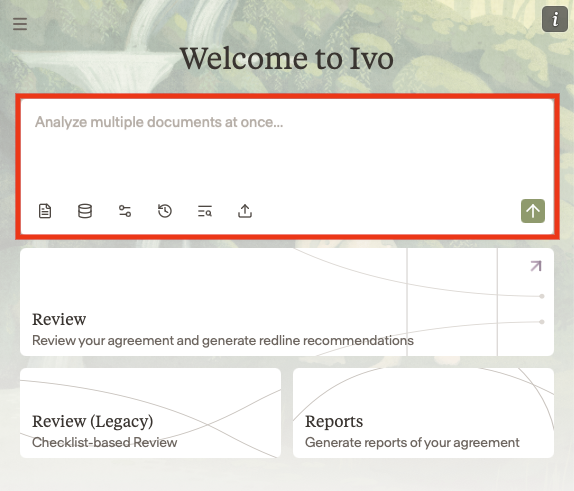
Enter a prompt into assistant
Hit enter or click the green arrow at the bottom right
Ivo will respond to your inquiry.
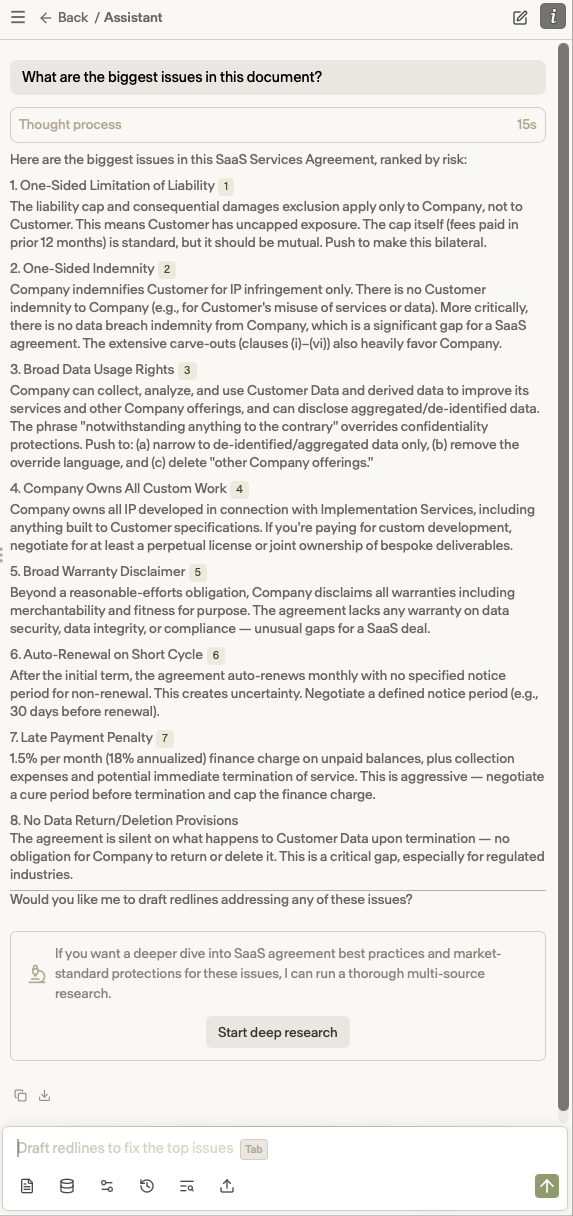
5. You can click on a source to navigate to the relevant passage in the document that addresses your question.
Toolbar Icons
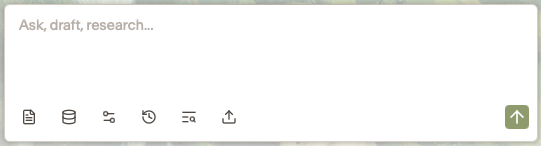
The toolbar icons are as follows:
Query Mode — Choose whether the Assistant operates on the entire document or only your selected text
Repository — Select a room from your Repository to use as a reference
Settings — Configure which sources the Assistant queries when pulling from external references
Conversation History — Browse your previous conversations
Prompt Library — Access and reuse your saved prompts
Upload Documents — Upload documents to provide context or use as a reference