3. Negotiation Lifecycle
Last updated: September 30, 2026
Collaborate is built around a turn-based negotiation model. Each round of the negotiation is tracked as a turn, and every version of the document is preserved so you have a full history of how the agreement evolved.
Turns and versions
Turns are defined by who holds the pen. A new turn begins when the document passes from one party to the other. Multiple internal versions can exist within a single turn as your team works through issues internally before sending.
Versions are saved states of the document. As a general rule:
If a draft is sent to the counterparty, it should be versioned up.
If a draft is received back from the counterparty, it should be versioned up.
Example:
Version | Description |
|---|---|
v1 | Counterparty paper received |
v2 | Your party's comments sent to counterparty |
v2.1 | Internal draft with first reviewer's comments |
v2.2 | Internal draft with additional reviewer's comments |
v3 | Counterparty's redlines received back |
Downloading a document does not itself change the turn or version. Upload a returned counterparty document only after you have actually received it.
Sending to the counterparty
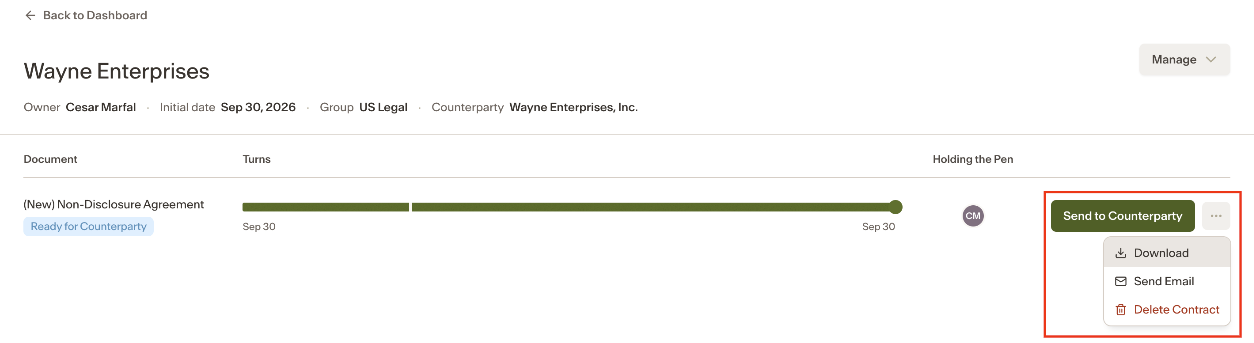
When the agreement is ready to send, open the ... menu next to Send to Counterparty to see your options:
Send Email — write a note and send the document directly from Collaborate. Only the deal owner can send the contract email. It is sent from an Ivo address with you copied, and any replies from the counterparty will come back to you.
Download — download the document as a Word file for manual sending.
Processing a returned version
When the counterparty sends back their redlines, the Matter Owner uploads the returned document into the existing Agreement.
To upload a returned turn:
From the Matter page, upload when the document is marked as sent to the counterparty, or
Use the upload button on the document page.
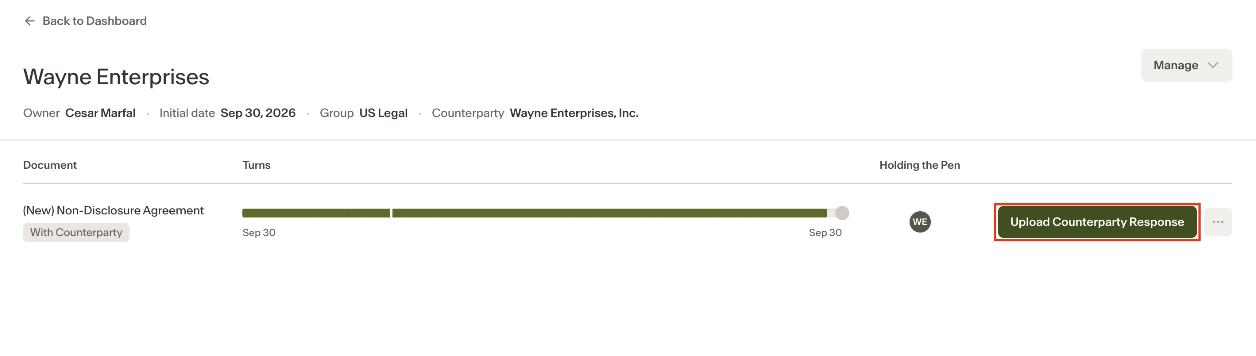
Returned-turn uploads are limited to the Matter Owner.
Once uploaded, AI Review automatically compares the returned version with the existing issues list:
Counterproposals the counterparty has accepted become Settled.
Disputed issues remain active.
Any newly introduced issues are added to the issues list.
All existing issues and their full history remain attached to the Agreement across turns.
Notes
Do not use home-page intake to upload a returned counterparty version. Intake is for new documents only. Use the Matter or document page upload for returned turns.
AI Review compares the returned version with the existing issues list even if the returned document does not contain tracked changes.
The Matter Owner is the only person who can upload a returned turn from the Matter or document page.